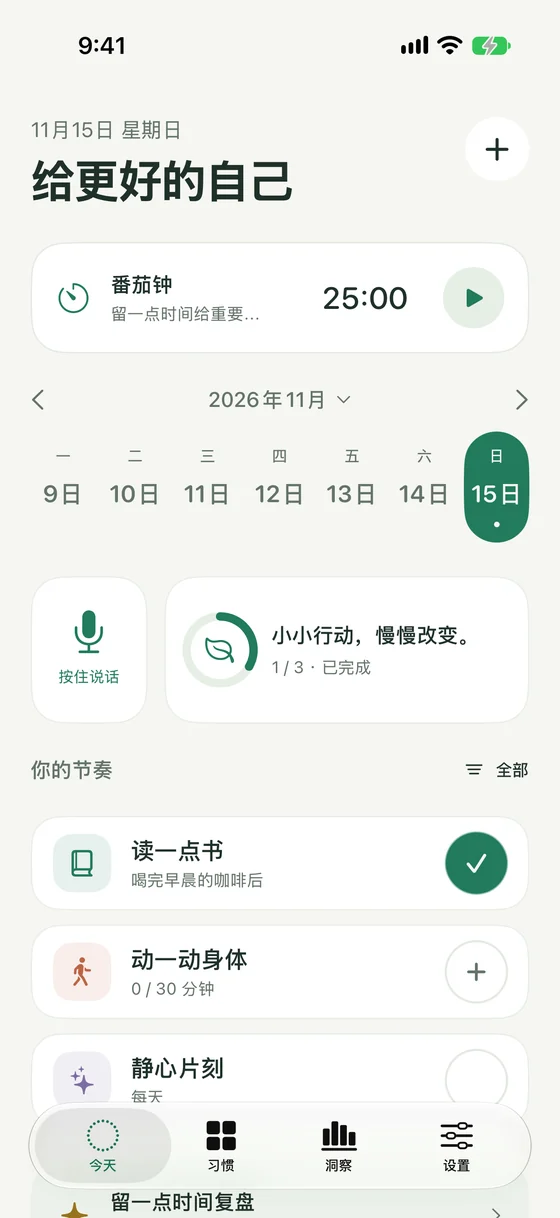
给更好的自己, 从一件小事开始。A better you. One small thing at a time.
不用一下子改变很多。选一个容易重复的小行动,留一点时间,慢慢找到自己的节奏。这里有开始的方法,也有需要时的帮助。You don’t have to change everything at once. Choose something small, make a little room, and find your rhythm. Here’s how to begin, and where to find help along the way.
首次打开,从 12 个微小行动中选三个。也可以跳过,点击首页「+」,只填写名称就能创建。On first launch, choose three of twelve tiny actions. Or skip, tap + on the home screen, and create a habit with just a name.
02
做到了,就轻轻记一下Do a little. Mark it down.
点击圆圈打卡,数量习惯填写当天实际总量。不小心点错,可以撤销;过去的记录也能在详情中修改。Tap the circle to check in, or record a day’s actual total for a quantity habit. Undo mistakes and edit earlier dates in habit details.
03
找到适合自己的节奏Make the rhythm your own
从每天到每周几次,按需调整目标。用提醒、小组件和番茄钟帮一点忙,也给休息留一点空间。Adjust goals from daily to a few times a week. Let reminders, widgets and Pomodoro help, with a little space for rest.
随时翻一翻MAKE YOURSELF AT HOME
你的日常,使用指南。A guide to your everyday.
从记录第一天,到留住每一份积累。From your first check-in to keeping every little bit.
Tap the circle beside a habit in Today to check in; tap again to undo. For quantity habits, tap + and enter the actual total for that day, not the difference from yesterday. Open habit details to edit past dates, add notes or skip a day.
A name is all you need to create a habit. Goals, schedules, reminders and other options can come later. Tap the icon in habit details to change its icon or color.
Hold the microphone on the home screen, say a habit name, then release and wait for recognition to create it. Slide your finger off the button to cancel. Leaving the page or backgrounding also cancels. Unclear speech never creates an empty habit.
Allow microphone and speech recognition when asked. Recognition follows the app language setting, or the system language/region when set to System. Apple Speech may use the internet; the app does not save recordings. Manual entry is always available.
Choose daily, selected weekdays, times per week/month, fixed intervals or a custom frequency. Quantity goals can accumulate by day, week or month, with At least or At most targets. Weeks start on Monday; months follow the calendar.
A light checkmark means earned rest after a flexible goal is met, not an extra check-in. Skipping a day does not reduce strength. An unrecorded quantity is unknown and is never assumed to be zero.
Start from the Pomodoro card on the home screen. Choose 5, 15, 25 or 45 minutes; 25 is the default. Pause and resume as needed. Progress survives backgrounding and relaunch. Start a 5-minute break manually when finished, or a 15-minute break after four rounds.
A linked habit is never checked off automatically; record it yourself when ready. Notifications enable completion alerts, but timing still works without permission. The current timer session is not part of habit JSON/CSV backups.
05
让提醒和小组件帮一点忙A little help from reminders and widgets
Enable reminders in a habit, choose a time and optional weekdays, then allow iOS notifications. Open the Home Screen widget gallery and search for LeanHabits to add Today, One Habit or Pomodoro widgets.
Today supports direct check-ins. One Habit lets you choose a habit and one of six views. Quantity corrections open the app for editing. Small and medium Pomodoro widgets can start, pause and resume focus.
Open Settings → Your data. Use JSON for a full backup and restore, or CSV to view records in a spreadsheet; CSV cannot fully restore them. You can also import a Loop Habit Tracker database, preview it, then merge or replace. Merging keeps existing records when the same date conflicts.
Automatic backups keep up to seven daily snapshots before changes, on your device, without uploading to a separate cloud service. Deleting the app also deletes these local copies. Export JSON to a safe location before switching devices or reinstalling.
也许你正在找A FEW THINGS YOU MIGHT BE WONDERING
一些常见问题。A little help, right here.
如果这里没有你要的答案, 欢迎给我们写一封邮件。If your question isn’t here, you’re welcome to write to us.
为什么删除所有习惯后,没有再次出现新手页?Why does deleting every habit not bring back onboarding?
首次选择或跳过后,应用会记住引导已完成。之后可以通过首页「+」自由创建;删除所有习惯不会重复引导。Once you choose starter habits or skip, onboarding is marked complete. Use + on the home screen to create more. Deleting all habits does not repeat the introduction.
语音没有识别出来,或者识别语言不对?Why is voice input unavailable or using the wrong language?
检查 iPhone 系统设置中的麦克风、语音识别权限,以及「通用 → 键盘 → 启用听写」。识别跟随应用语言;应用设为 English 时适合说英文。Apple Speech 的可用性与设备、语言和网络有关。仍不可用时,请用「+」手动创建。Check microphone and speech recognition permissions in iPhone Settings, and General → Keyboard → Enable Dictation. Recognition follows the app language; choose English in the app for English speech. Apple Speech availability depends on the device, language and network. You can always use + to create manually.
没有收到提醒,要检查什么?What should I check if a reminder does not arrive?
确认该习惯的提醒时间和星期正确、习惯没有归档,并在 iOS 设置中允许 LeanHabits 通知。检查专注模式是否静音了提醒。番茄钟被拒绝通知后仍可计时,但不会显示结束通知。Confirm the habit reminder time and weekdays, and that the habit is not archived. Allow LeanHabits notifications in iOS Settings and check whether Focus is silencing them. Pomodoro timing still works without permission, but completion alerts will not appear.
换手机后,记录会自动同步吗?Will my records automatically sync to a new phone?
LeanHabits 没有账户或应用内云同步。请先在旧设备导出 JSON,在新设备导入。iOS/iCloud 设备备份是否包含数据,由系统设置控制;不要只依赖应用内的本地副本。LeanHabits has no accounts or in-app cloud sync. Export JSON on your old device and import it on the new one. System or iCloud device backups depend on your settings. Do not rely solely on the app’s local copies.
浅色勾、跳过和数量为零有什么区别?How do rest, skipping and zero quantities differ?
浅色勾是灵活频次达标后派生的休息日,不增加实际打卡次数。跳过会保留连续记录,但不是实际完成。数量为零需要明确记录;未填写不会自动记为零,也不会自动完成「至多 0」目标。A light checkmark is earned rest derived from a flexible goal; it adds no recorded check-in. Skipping preserves a streak without counting as completion. Zero must be recorded explicitly. A missing value never becomes zero or automatically completes an At most 0 goal.
能调整首页、外观和语言吗?Can I change the home layout, appearance and language?
拖动首页的录音卡片或统计卡片,可以交换左右位置,应用会记住。设置中可选择浅色、深色或跟随系统,并选择界面语言。Drag the voice or summary card on the home screen to swap sides; your choice is saved. In Settings, choose Light, Dark or System appearance and your preferred interface language.
删除习惯后,怎样恢复?How can I recover a deleted habit?
删除会移除当前主数据中的习惯及历史。若有删除前的本地快照或手动导出的 JSON,可在「设置 → 你的数据」中预览并恢复。替换会影响现有数据,请先备份当前记录;较早的导出文件需自行保管和删除。Deletion removes a habit and its history from the current main data. If you have an earlier local snapshot or exported JSON, preview and restore it in Settings → Your data. Replacement affects current data, so back it up first. Keep and delete older exported files yourself.
我们在这里A NOTE IS ALWAYS WELCOME
需要一点帮助?Need a hand?
告诉我们你遇到的问题,以及设备型号、iOS 和应用版本。 如有截图,请先遮住私人记录;无需发送完整习惯备份。Tell us what happened, your device model, and your iOS and app versions. Hide private records in screenshots. There’s no need to send your full backup.